

Enable a service account for Sigma tables on an OAuth connection (Beta)
This documentation describes one or more public beta features that are in development. Beta features are subject to quick, iterative changes; therefore the current user experience in the Sigma service can differ from the information provided in this page.
This page should not be considered official published documentation until Sigma removes this notice and the beta flag on the corresponding feature(s) in the Sigma service. For the full beta feature disclaimer, see Beta features.
On an OAuth connection, you can enable a service account to create and modify the underlying database tables for Sigma tables. Using a service account allows you to centralize Sigma table ownership governance, avoiding issues that can occur when Sigma uses individual users’ own data platform credentials.
This document explains why it’s beneficial to configure a service account for Sigma tables on an OAuth connection and how to enable it. For general information about access to Sigma tables, see Configure access for organization-wide Sigma tables.
-
Sigma tables are currently supported by Snowflake, Databricks, and PostgreSQL connections.
-
In Databricks, a service account is referred to as a “service principal.” If you use a Databricks connection, apply the guidance in this document to your service principal.
Requirements
Configuring a service account to create and modify Sigma tables requires the following:
- You must be assigned the Admin account type.
- The connection must have OAuth enabled and a service account configured. To configure a service account, see the Complete your OAuth configuration step for your connection type: Snowflake or Databricks.
Why use a service account for Sigma tables
By default, an OAuth connection doesn’t use a service account for Sigma tables. In this scenario, when a user creates or modifies a Sigma table, Sigma uses the user’s own data platform credentials to create or modify the underlying database table, and the resulting table is owned by whichever identity performed the operation (i.e., the user’s role in Snowflake, or the individual user in Databricks). If you use Snowflake, this means all other users who share that role can alter or drop the table. If you use Databricks, this means the table can be orphaned if its owner leaves your organization.
You can avoid these risks by using a service account to create and modify the underlying database tables for Sigma tables. Instead of a role or individual user, the service account owns every table it creates, and Sigma access grants like Can create table and Can own continue to determine who can perform each operation.
Read and write access to Sigma table data is unaffected, and continues to be determined by each user’s own data platform permissions.
Enable the service account for Sigma tables
If a service account is configured on your OAuth connection, you can enable it for Sigma tables in the Administration portal. Sigma can then use the service account to create and modify underlying database tables for newly created Sigma tables, centralizing ownership governance in Sigma.
Enabling the service account for Sigma tables doesn’t transfer ownership of existing underlying database tables. Modifying those tables from Sigma fails until a data platform admin reassigns ownership to the service account using GRANT OWNERSHIP in Snowflake or ALTER TABLE ... OWNER TO in Databricks.
-
In Sigma, go to Administration > Connections and select the relevant connection.
-
In the connection’s overview page, click Edit.

-
In the Service account configuration section, turn on the Use for Sigma tables toggle.
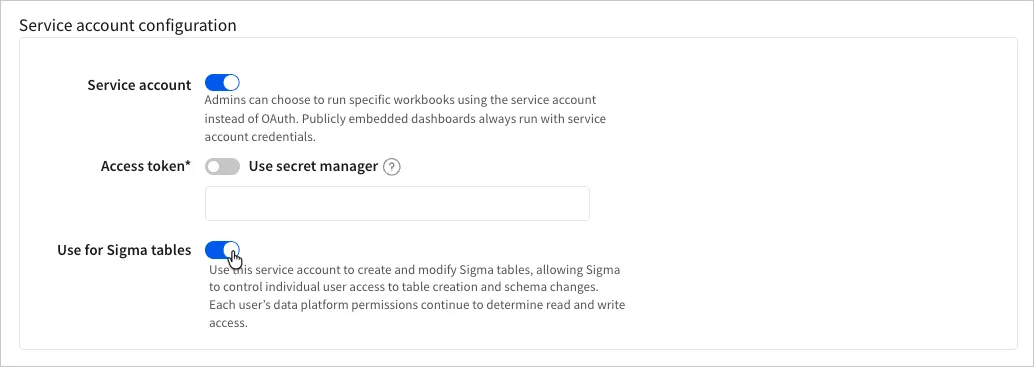
-
Click Save to update the connection.
Disable the service account for Sigma tables
If you no longer want Sigma to use the service account to create and modify underlying database tables for Sigma tables, you can disable it in the Administration portal. Sigma then uses each user’s own data platform credentials to create and modify underlying database tables for newly created Sigma tables.
Disabling the service account for Sigma tables doesn’t transfer ownership of existing underlying database tables. Modifying those tables from Sigma fails until a data platform admin reassigns ownership to the relevant user using GRANT OWNERSHIP in Snowflake or ALTER TABLE ... OWNER TO in Databricks.
- In Sigma, go to Administration > Connections and select the relevant connection.
- In the connection’s overview page, click Edit.
- In the Service account configuration section, turn off the Use for Sigma tables toggle.
- Click Save to update the connection.