

AI usage dashboard
The AI usage dashboard displays AI token usage across the entire organization for all relevant product surfaces that use AI, such as Sigma agents, Sigma Assistant, and the formula assistant.
For example, if you want to evaluate changes that you make to agent instructions or the configured AI provider, use the AI usage dashboard to review the resulting effects on usage and token consumption. If you want to evaluate changes that you make to the AI context for data models configured for Sigma Assistant or the configured AI provider, use the Assistant (Home) tab to review the resulting effects on usage and token consumption.
User and system requirements
- You must be assigned the Admin account type.
- The dashboard must be configured. See Configure AI usage dashboards.
Review AI usage dashboard
The AI usage dashboard includes the following information. You can filter by product and date range, or choose to filter by user, sentiment, model used, agent, or team name:
You can also use natural language to ask questions about the data using the AI usage analyst agent. No tokens are consumed by the AI usage analyst unless you interact with the agent.
If you want to customize the AI usage dashboard, click Add to workspace to open the dashboard for editing as a new workbook in your Documents folder.
Set up alerts for token consumption
If you want to monitor token consumption across your organization, you can set up a conditional alert on a customized version of the AI usage dashboard.
For example, send a notification when total token usage crosses a threshold of 10,000 tokens per day.
You can alert on any data available in the dashboard, such as token consumption by product, or customize the data view to show different time granularity.
-
On the AI usage dashboard, click Add to workspace to open the dashboard as a new workbook in your Documents folder.
-
To notify on total tokens consumed, select the Tokens KPI chart.
-
For the KPI chart, click
 More to open the element menu and select Alert when.
The Schedule exports modal opens.
-
In this example, set up an email notification. For Recipient, enter one or more email addresses to be sent an email when token consumption exceeds the threshold.
-
For Subject, enter a subject for the email. For example, “Sigma AI usage over threshold”. Optionally use dynamic text to specify a formula and display the threshold value in the subject. For example, use the formula:
Max([TOKENS/Total Tokens). -
For Message, enter a message for the email. Optionally use dynamic text to specify a formula and display the threshold details in the message. For example, “Token consumption for Sigma AI-powered features is over the alert threshold. Review the usage patterns.”, and optional formulas like the following:
- To show the total tokens consumed, use a formula like:
Max([TOKENS/Tokens]). - To show how many of those tokens are used by Sigma agents, use a formula like:
If([TOKENS/Product]="Agent", Max([TOKENS/Tokens]), 0).
- To show the total tokens consumed, use a formula like:
-
In the Attachments section, change the attachment to provide relevant details. For example, choose a CSV of the AI Usage Table element to more easily review product usage details, or choose a PNG of the KPI chart to make the token consumption more visible.
-
For Frequency, select the frequency at which you want the alert to trigger. Because the alert is conditional, the frequency is how often the conditions are evaluated before sending an email. In this example, you want to evaluate token consumption per day, so set a frequency of daily.
Because you set up an alert, Send is set to If a condition is met.
-
In the Condition section, configure the threshold that triggers the alert:
- Leave the defaults for Send to If a condition is met and Data element to the New Overview - TOKENS element.
- Set Check if to Any value.
- For In column, select TOKENS.
- For Is, select Greater than.
- For Value, enter the token threshold you want to be notified at. For example, 10000.
-
Turn on the Stop notifying after 1 occurrences in a day toggle to avoid getting multiple alerts for the same activity.
-
Filter the table to the last 24 hours of data:
- Select the checkbox for Customize control values, then select time-filter, the date range control.
- Modify the selection to Last 24 hours.
If you want to alert on more specific token consumption, choose another control to customize:
- To alert on token consumption for Sigma agents, select the Product control, then specify a product. For example, Agent.
- To alert on token consumption for a particular team, select the team-control, then specify a team name.
- To alert on token consumption for a particular user, select the user-name-control, then specify a user name.
-
Click Create to save the alert.
For more options, see Schedule a conditional export or alert. Test your export by sending it to yourself to confirm that the data looks as you expect.
You can use alerts to monitor consumption, but if possible, set spending limits or budgets in your AI provider.
If you use Snowflake as your AI provider, consider creating a custom budget to cap and track AI spending. See Custom budgets in the Snowflake documentation. For other AI providers, manage or limit consumption using the controls available in that provider.
AI usage table in connection browser
If you are granted access to the relevant schema, you can also explore the AI usage data in the relevant table in the connection browser.
AI usage is stored in a table called AI_USAGE_<ORGANIZATION_NAME> in the configured location.
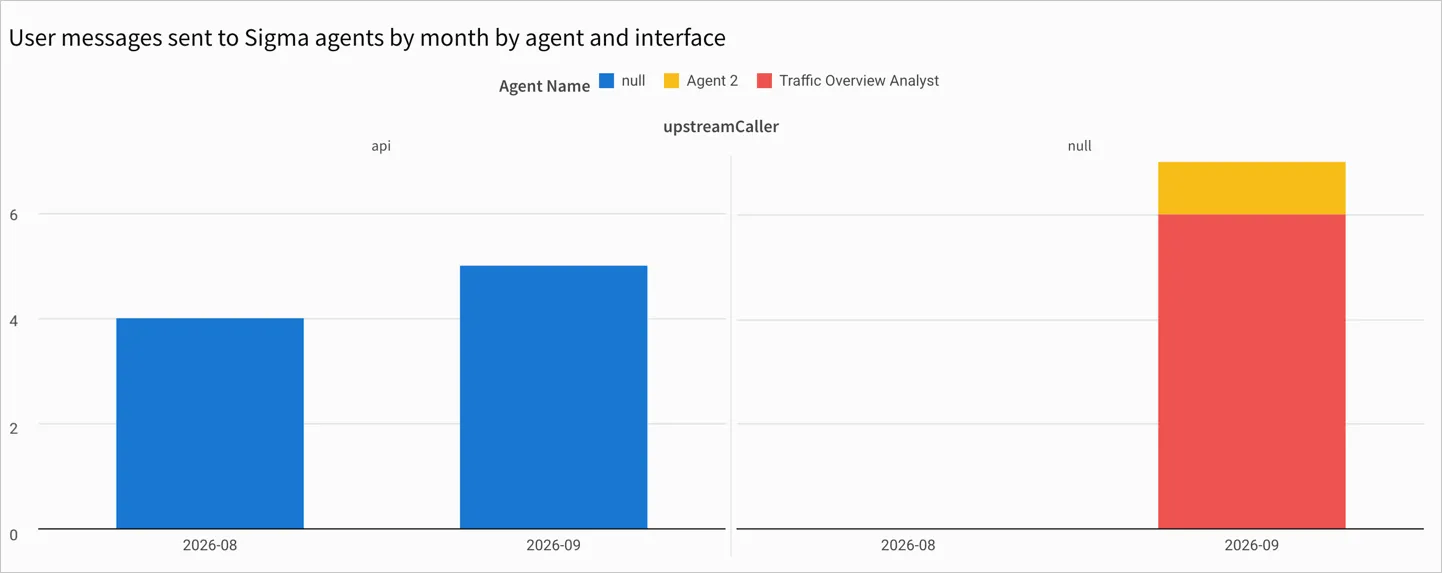
Estimate current Sigma agent usage
To estimate the current number of messages sent to Sigma agents before agents become a paid offering, you can use the data in the AI_USAGE table used by the AI usage dashboard, if you have one set up.
This calculation provides a rough estimate, and does not correspond to the exact messages that are billed in consumption billing. Credit consumption can be reviewed on the Consumption usage dashboard.
-
Locate the AI usage table in the connection browser.
-
Click Explore to open an ad hoc exploration with the data from the AI usage table.
-
To remove irrelevant messages, filter out messages sent to the agent assistant (which helps configure a Sigma agent) from the data. Filter out rows with an Agent Name of
Agent Builder (Configure)and an Agent ID ofunknown. -
Calculate the estimated number of messages sent to Sigma agents in your organization:
-
To see messages sent for the entire period recorded in the AI_USAGE table, create a summary calculation on the table with the formula
CountDistinctIf([Trace Id], IsNull([Parent Id]) and [Trace Name]="custom-agent"). -
To see messages sent over time:
-
Create a bar chart as a child element of the table.
-
For the y-axis, add a calculated column with the following formula:
-
For the x-axis, use the Timestamp column, truncated to Month.
-
(Optional) Add Agent Name as a color-by category to the chart. Agents with a
nullname might be agents called from the API. -
(Optional) Extract the
upstreamCallervalue from the Metadata column to identify whether the agent was used in a chat element, called from the API, an automated action, or the home page. Usage data collected prior to September 15, 2026 shows anullvalue forupstreamCaller.
-
-
Warehouse agent usage
When you use a warehouse agent with Sigma, such as a Snowflake Cortex Agent or a Databricks Genie Agent, the warehouse agent does not use the AI provider configured in Sigma.
The AI usage dashboard in Sigma does not include the token usage or cost for the warehouse agent. It tracks only the inference that Sigma performs to invoke the warehouse agent and interpret its response when you use the warehouse agent with a Sigma agent. If you use warehouse agents with Sigma Assistant, no inference is performed with the AI provider configured in Sigma and all token consumption occurs in your data platform.
To review token usage and cost for a warehouse agent, use the request ID recorded for the interaction in the AI usage table and cross-reference the usage data collected by your data platform for the agent:
- For a Snowflake Cortex Agent, cross-reference the request ID against the CORTEX_AGENT_USAGE_HISTORY view in the Snowflake documentation.
- For a Databricks Genie Agent, see Monitor and understand your Genie cost in the Databricks documentation.
Sigma also provides AI cost templates to help review AI costs from your data platform.