

CumulativeAvg
The CumulativeAvg function calculates the numerical average of the input column up to and including the current value.
Syntax
Function Arguments:
- [Column] (required) - The column of numbers to evaluate the cumulative average.
Notes
- Cumulative functions depend on the order of the given column. If you change the sort order, the result in each row changes.
Example
In a table that contains the monthly revenue of a store, the CumulativeAvg function can be used to find the average up to and including the current .
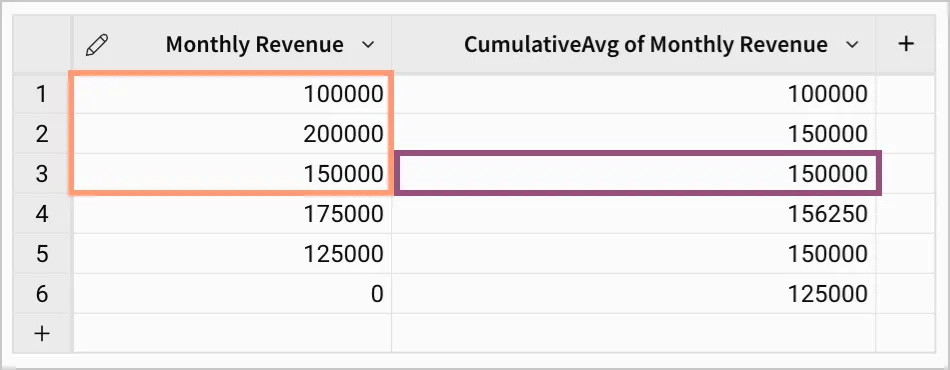
In row three of this example, the value highlighted in the column CumulativeAvg of Monthly Revenue is 150000. This is the average of the values in the column Monthly Revenue up to and including the value in row three. The average is calculated as (100000 + 200000 + 150000) / 3 = 150000.
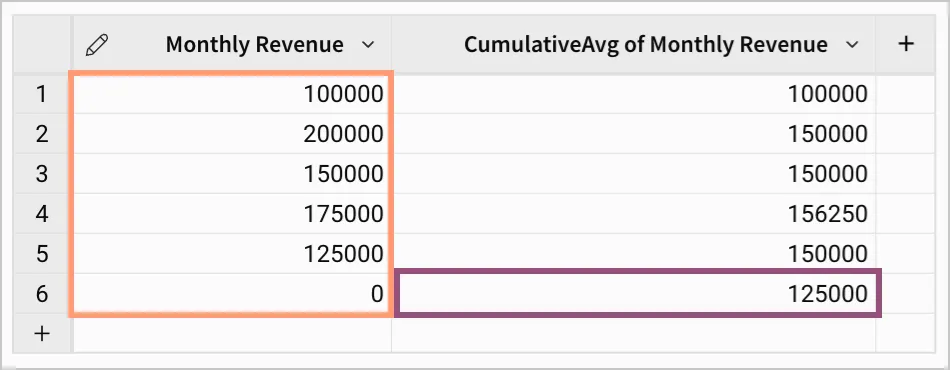
In the final row of this example, the value highlighted in the column CumulativeAvg of Monthly Revenue is 125000. This is the average of all values in the column Monthly Revenue. In this example, the average is calculated as (100000 + 200000 + 150000 + 175000 + 125000 + 0) / 6 = 125000.