

RowNumber
Number the rows in the table using the input column. Begins with 1.
Syntax
Function arguments:
- column
- (optional) The column used to order the table. The input column can be numbers, dates or text.
- direction
- (optional) The direction to sort the input column. Default is to sort ascending.
Each row is numbered according to the input column’s ordering, without taking into account duplicate values. For example, if the input includes “Anne”, “Jane”, “Jane” and “Pari”, the values would be ranked 1, 2, 3 and 4.
Example
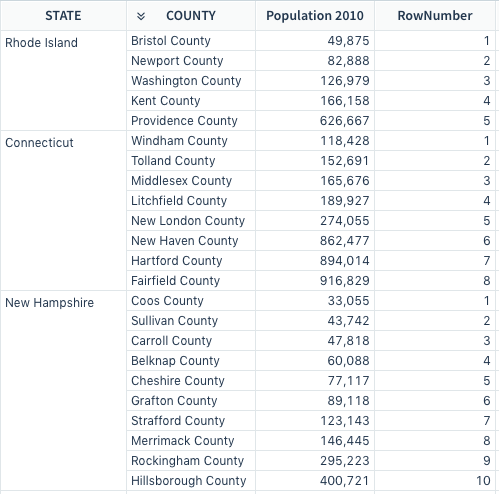
This formula assigns the smallest population 1, the second smallest 2 and so on, with each population being assigned the next number in the sequence even when the values are identical.
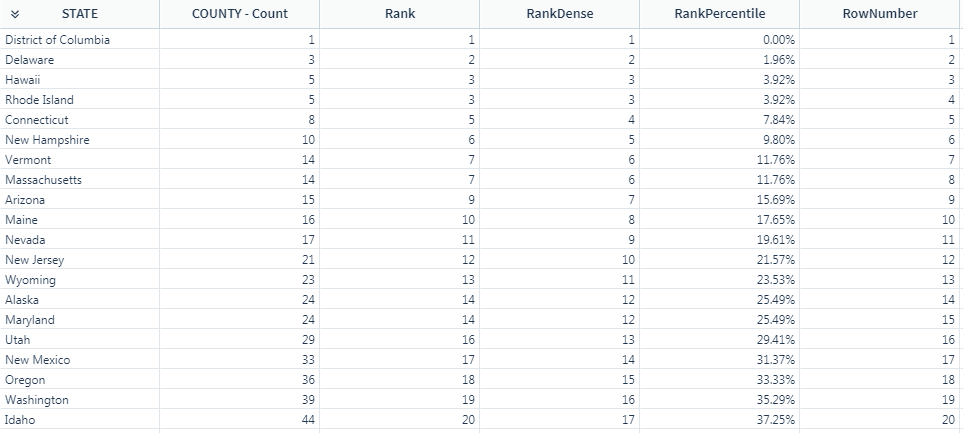
In this example, review the differences between the different ranking functions.