
Repeat
The Repeat function returns a string created by repeating a given string a specified number of times.
Repeat is one of the Text functions supported by Sigma.
Syntax
Repeat(string, number)Repeat has the following arguments:
- string
- Required
- The string that the function repeats
- number
- Required
- The number of times the string repeats.
- The zero,
0, and negative values both return aNULLstring.
Examples
The following table shows the output of using Repeat on the Product Type column.
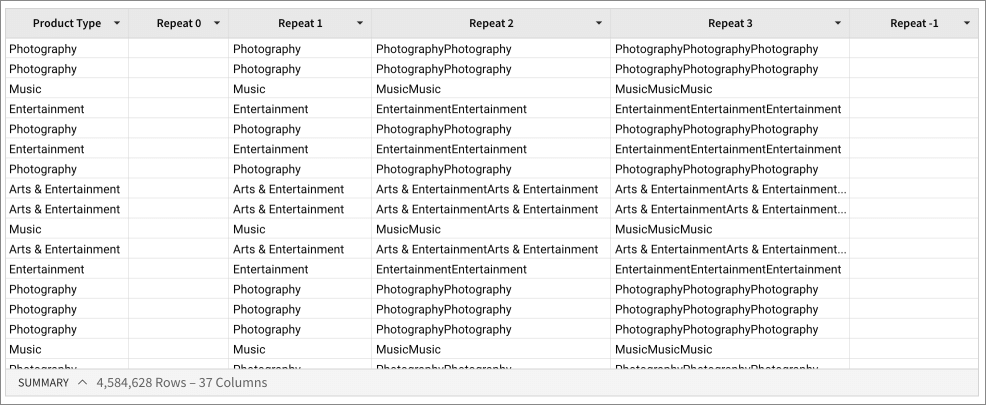
Repeat([Product Type], 0)Returns an empty string as the Product Type is repeated zero times.
Repeat([Product Type], 1)Returns each Product Type value unchanged.
Repeat([Product Type], 2)Returns each Product Type value repeated twice.
Repeat([Product Type], 3)Returns each Product Type value repeated three times.
Repeat([Product Type], -1)Returns an empty string.
You can also use Repeat to add leading zeros to a fixed-length value. For example, to format invoice IDs as eight-digit numbers with leading zeros:
Concat(Repeat("0", 8 - Len([Invoice ID])), [Invoice ID])Len([Invoice ID]) evaluates how many zeros are needed to reach a total length of 8 characters. Repeat is used to create the required number of zeros. Concat joins the zeros to the front of the invoice ID, producing the final fixed-length value. As a result, an example ID of 12345 returns 00012345, and an example ID of 1234 returns 00001234.