
DateLookback
The DateLookback function returns the value of a variable at a previous point in time (or lookback period) determined by a specified date and offset.
DateLookback is a date function.
The DateLookback function is best used on a grouped column with a truncated date and unique values. If the grouping includes additional non-date columns, or if the grouping includes additional logic such as a fiscal year calculation, consider using the Lookup function instead. For an example using the Lookup function for this use case, see Why doesn’t DateLookback work when I’m using custom fiscal years/quarters? in the Sigma Community.
Syntax
DateLookback(value, date, amount, period)Function arguments:
| value | (required) | The value to look up. Can be a column to reference, a formula to compute, or a constant. |
| date | (required) | The date to reference when offsetting the lookback period. Can be a date, date column, or formula that returns a date. |
| amount | (required) | The number of periods to offset the lookback period. Can be a positive integer (for lookback) or negative integer (for lookahead). |
| period | (required) | The unit of time to use for the offset and lookback period. Can be "year", "quarter", "month", "week", "day", "hour", "minute", or "second". |
Notes
- The period argument cannot be a column.
- The period argument does not need to match the truncation of the grouping in the date column. For example, a table grouped by day can use a week period to look back a week from each day.
- If the period argument is a smaller unit of time than the truncation of the date column, the function returns
Null. For example, a table grouped by day cannot use an hour period to look back an hour from each day. - If there is no data for the lookback period, or the lookback period is outside the range of the data, the function returns
Null. For example, if the data is grouped by the hour, and the lookback period is 1 day, the function returnsNullfor any rows in the first day, as there is no data for that hour on the previous day. - The value must be unique in the grouping of the date column. If there are multiple values for the same date or truncated date, the function returns
Null.- For example, if a table is grouped by Quarter of Date and Status in the same grouping, a DateLookback that targets the Status returns
Nullany time there are multiple Status values in the underlying grouping. Instead, group by date only, and move Status to a separate grouping or calculation.
- For example, if a table is grouped by Quarter of Date and Status in the same grouping, a DateLookback that targets the Status returns
Examples
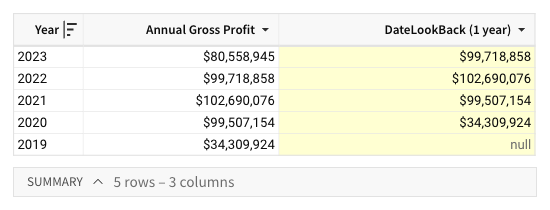
A table includes an Annual Gross Profit column containing the gross profit for each year between 2019 and 2023. You can use the DateLookback function to return the previous year’s gross profit and facilitate a period-over-period analysis.
DateLookback([Annual Gross Profit], [Year], 1, "year")The formula determines a one-year offset from the period in the Year column, then references the offset period and returns the corresponding value from the Annual Gross Profit column.
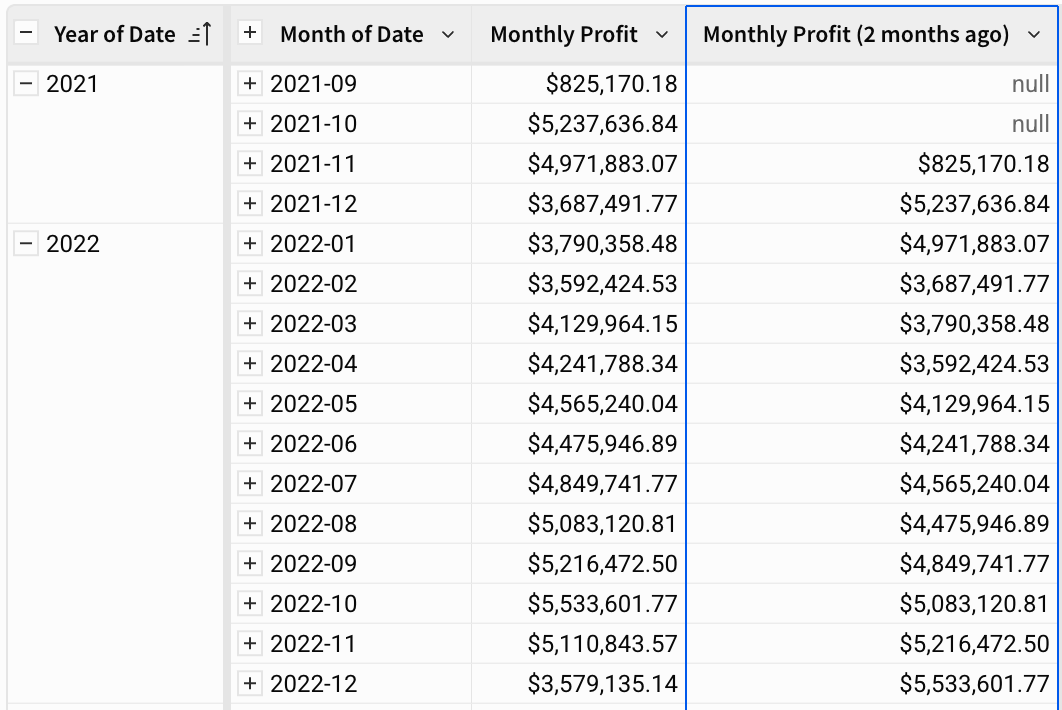
DateLookback([Monthly Profit], [Month of Date], 2, "month")The formula determines a two-month offset from the period in the Month of Date column, then references the offset period and returns the corresponding value from the Monthly Profit column.
A table tracks the monthly Status of each account, grouped by Month of Date. You can use the DateLookback function to compare each account's current status to its status one month earlier.
DateLookback([Status], [Month of Date], 1, "month")The formula determines a one-month offset from the period in the Month of Date column, then returns the corresponding Status value from that earlier month. However, if the value for the targeted date grouping contains multiple values - for example, a month where the status changes from one week to the next - the function returns Multiple values rather than the most recent earlier status.