> For clean Markdown of any page, append .md to the page URL.
> For a complete documentation index, see https://help.sigmacomputing.com/llms.txt.
> For AI client integration (Claude Code, Cursor, etc.), connect to the MCP server at https://help.sigmacomputing.com/_mcp/server.
# SplitToArray
> Use the Sigma SplitToArray function to split a specified string by a given delimiter and return an array of substrings.
The **SplitToArray** function splits a specified string by a given delimiter and returns an array of substrings.
This function isn't compatible with all data platform connections. To check if your connection supports it, see [Supported data platforms and feature compatibility](/docs/region-warehouse-and-feature-support#supported-data-platforms-and-feature-compatibility).
## Syntax
```
SplitToArray(String, Delimiter)
```
### Function arguments
| | |
| :------------ | :------------------------------------------------------------------------------------------------------------------- |
| **String** | The input string to split.
- This is dynamic and can be either a column or a specified string.
|
| **Delimiter** | The string to split on.
- This is dynamic and can be either a column or a specified string.
|
## Notes
* If either argument is `null`, the function returns `null`.
* If the **Delimiter** is an empty string, the **String** is split into an array of individual characters.
* If **String** is an empty string, an array containing an empty string is returned.
* If the **Delimiter** is not in the specified string, the original string is returned.
## Examples
```
SplitToArray("a_b_c", "_")
```
Splits the string `"a_b_c"` by the delimiter `"_"` and returns the array `"a","b","c"`.
```
SplitToArray("abc","")
```
As the specified delimiter is an empty string, **SplitToArray** returns the input string as an array of individual characters (`"a","b","c"`).
```
SplitToArray("abc", Null)
```
As the specified delimiter is `Null`, **SplitToArray** returns `null`.
```
SplitToArray("hello world", " ")
```
Splits the string `"hello world"` by the specified delimiter (an empty space), and returns the array `["hello", "world"]`.
### Example using dynamic columns
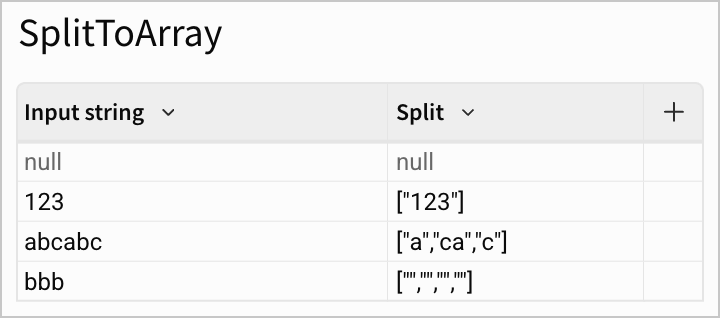
In the table above, the *Split* column in the table above uses the following formula:
```
SplitToArray([Input string], "b")
```
This takes the string in the column *Input string* and splits it by the delimiter `"b"`:
* As the input string is `null`, **SplitToArray** returns `null`.
* As there is no value `"b"` in the string `"123"`, **SplitToArray** returns the original string as an array.
* Splits `"abcabc"` by `"b"` and returns the array `["a","ca","c"]`.
* Splits `"bbb"` by `"b"` and returns the array `["","","",""]`.