> For clean Markdown of any page, append .md to the page URL.
> For a complete documentation index, see https://help.sigmacomputing.com/llms.txt.
> For AI client integration (Claude Code, Cursor, etc.), connect to the MCP server at https://help.sigmacomputing.com/_mcp/server.
# MonthName
> Use the Sigma MonthName function to return the name of the month component from a specified datetime value.
The **MonthName** function returns the name of the month component from a specified datetime value.
## Syntax
```
MonthName(date)
```
Function arguments:
| | |
| :------- | :------------------------------------------------------------------------------------------------------------------------------------------------------------------------------------------ |
| **date** | The value or column to reference when evaluating the month component.
- Must be a datetime value or column containing [date data](/docs/data-types-and-formats#date).
|
## Notes
* If the **date** argument references text or number data, use the **[Date](/docs/date)** function to convert the value or column to the [date data type](/docs/data-types-and-formats#date).
## Examples
### Example 1
```
MonthName(Date("2023-05-04"))
```
Evaluates `2023-05-04` as a datetime value and returns `May` as the name of the month component.
### Example 2
```
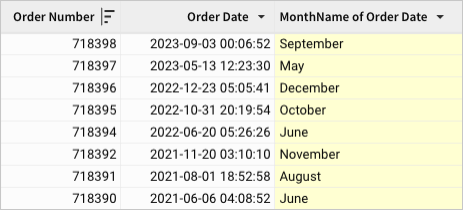
MonthName([Order Date])
```
References the *Order Date* column and returns the name of the corresponding month component for each row.
## Related resources
* [Month](/docs/month)