> For clean Markdown of any page, append .md to the page URL.
> For a complete documentation index, see https://help.sigmacomputing.com/llms.txt.
> For AI client integration (Claude Code, Cursor, etc.), connect to the MCP server at https://help.sigmacomputing.com/_mcp/server.
# DateLookback
The **DateLookback** function returns the value of a variable at a previous point in time (or lookback period) determined by a specified date and offset.
**DateLookback** is a [date function](/docs/date-functions).
The **DateLookback** function is best used on a grouped column with a [truncated date](/docs/datetrunc) and unique values. If the grouping includes additional non-date columns, or if the grouping includes additional logic such as a fiscal year calculation, consider using the **Lookup** function instead. For an example using the **Lookup** function for this use case, see Why doesn’t DateLookback work when I’m using custom fiscal years/quarters? in the Sigma Community.
## Syntax
```
DateLookback(value, date, amount, period)
```
Function arguments:
| | | |
| :--------- | :--------- | :----------------------------------------------------------------------------------------------------------------------------------------------------------- |
| **value** | (required) | The value to look up. Can be a column to reference, a formula to compute, or a constant. |
| **date** | (required) | The date to reference when offsetting the lookback period. Can be a date, date column, or formula that returns a date. |
| **amount** | (required) | The number of periods to offset the lookback period. Can be a positive integer (for lookback) or negative integer (for lookahead). |
| **period** | (required) | The unit of time to use for the offset and lookback period. Can be `"year"`, `"quarter"`, `"month"`, `"week"`, `"day"`, `"hour"`, `"minute"`, or `"second"`. |
## Notes
* The **period** argument cannot be a column.
* The **period** argument does not need to match the truncation of the grouping in the **date** column. For example, a table grouped by day can use a week period to look back a week from each day.
* If the **period** argument is a smaller unit of time than the truncation of the **date** column, the function returns `Null`. For example, a table grouped by day cannot use an hour period to look back an hour from each day.
* If there is no data for the lookback period, or the lookback period is outside the range of the data, the function returns `Null`. For example, if the data is grouped by the hour, and the lookback period is 1 day, the function returns `Null` for any rows in the first day, as there is no data for that hour on the previous day.
* The **value** must be unique in the grouping of the **date** column. If there are multiple values for the same date or truncated date, the function returns `Null`.
* For example, if a table is grouped by *Quarter of Date* and *Status* in the same grouping, a **DateLookback** that targets the *Status* returns `Null` any time there are multiple *Status* values in the underlying grouping. Instead, group by date only, and move *Status* to a separate grouping or calculation.
## Examples
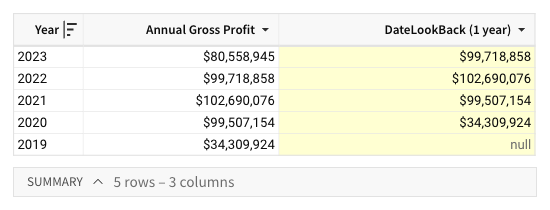
A table includes an *Annual Gross Profit* column containing the gross profit for each year between 2019 and 2023. You can use the **DateLookback** function to return the previous year’s gross profit and facilitate a period-over-period analysis.
```
DateLookback([Annual Gross Profit], [Year], 1, "year")
```
The formula determines a one-year offset from the period in the *Year* column, then references the offset period and returns the corresponding value from the *Annual Gross Profit* column.
```
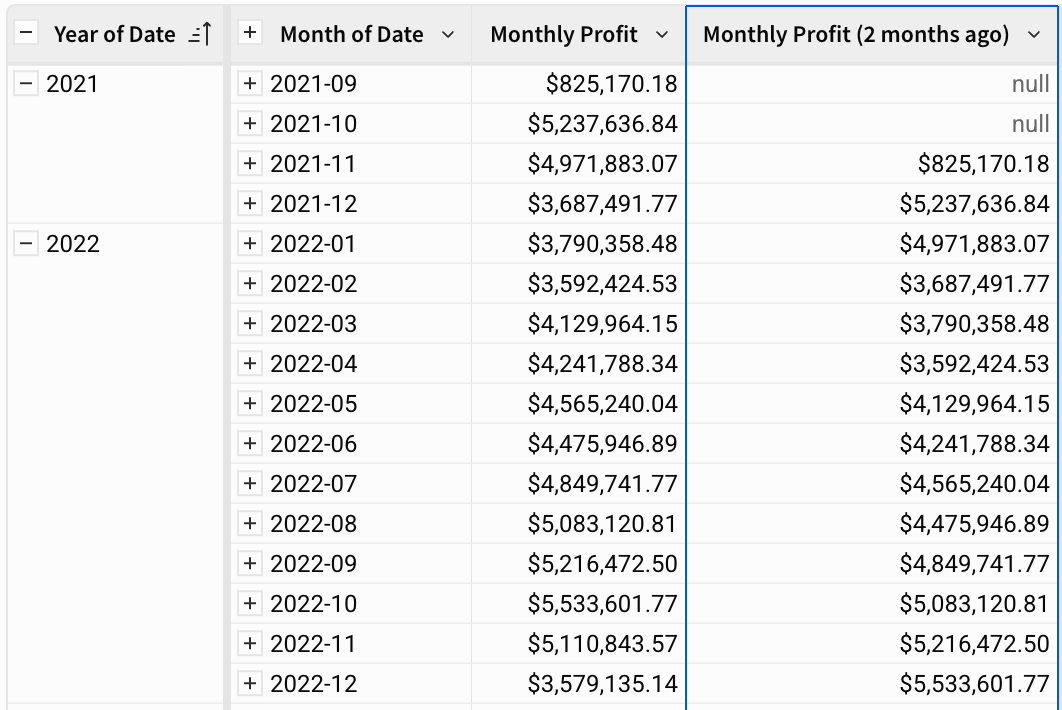
DateLookback([Monthly Profit], [Month of Date], 2, "month")
```
The formula determines a two-month offset from the period in the *Month of Date* column, then references the offset period and returns the corresponding value from the *Monthly Profit* column.
A table tracks the monthly *Status* of each account, grouped by *Month of Date*. You can use the **DateLookback** function to compare each account's current status to its status one month earlier.
```
DateLookback([Status], [Month of Date], 1, "month")
```
The formula determines a one-month offset from the period in the *Month of Date* column, then returns the corresponding *Status* value from that earlier month. However, if the **value** for the targeted **date** grouping contains multiple values - for example, a month where the status changes from one week to the next - the function returns `Multiple values` rather than the most recent earlier status.
## Related resources
*
Video How To: DateLookback() and Filters