> For clean Markdown of any page, append .md to the page URL.
> For a complete documentation index, see https://help.sigmacomputing.com/llms.txt.
> For AI client integration (Claude Code, Cursor, etc.), connect to the MCP server at https://help.sigmacomputing.com/_mcp/server.
# Contains
> Use the Sigma Contains function to search for a specified substring in a text value.
The **Contains** function searches for a specified substring in a text value. If the substring is found, the function returns `True`, otherwise it returns `False`.
## Syntax
```
Contains(string, substring...)
```
Function arguments:
| | |
| :--------------- | :--------------------------------------------------------------------------------------------------------------------------------------------------------------------------------------------------------------------------------------------------------------------------------------------------------------------------------------------- |
| **string** | A text value or column of text values to search.
- Individual text value input (not column input) must be enclosed in double quotes. For example, `"My name is Bob"`.
- Can only reference a column that contains [text data](/docs/data-types-and-formats#text).
|
| **substring...** | One or more substrings or columns of substrings to search for in the text value.
- Individual substring input (not column input) must be enclosed in double quotes. For example, `"is Bob"`.
- Multiple substrings must be input as separate arguments. For example, `"name", "is Bob"` or `[ColumnA], [ColumnB]`.
|
## Notes
* Arguments are case sensitive. To bypass case sensitivity, use the **[Lower](/docs/lower)** function to convert the arguments to lowercase as needed. See [Example 2](#example-2).
* When the multiple substring arguments are included, the function returns `True` if at least one substring is found.
## Examples
### Example 1
```
Contains("Welcome to Sigma", "to sig")
```
Returns `False` because "to sig" (with a lowercase 's') isn't a substring in "Welcome to Sigma."
### Example 2
```
Contains(Lower("Welcome to Sigma"), "to sig")
```
Converts the **string** argument to all lowercase characters and returns `True` because "to sig" is found as a substring in "welcome to sigma."
### Example 3
```
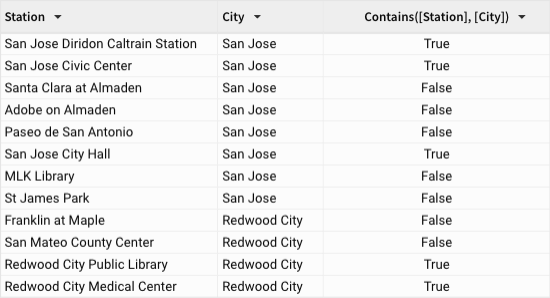
Contains([Station], [City])
```
Returns `True` when the city name (text value in the *City* column) is found as a substring in the station name (text value in the *Station* column). Otherwise, the function returns `False`.
### Example 4
```
Contains([Product Name], "Digital Camera", "DSLR")
```
Returns `True` when either "Digital Camera" or "DSLR" is found as a substring in the product name (text value in the *Product Name* column). Otherwise, the function returns `False`.
## Related resources
* [StartsWith](/docs/startswith)
* [Find](/docs/find)
* [EndsWith](/docs/endswith)